What to look for: two cats live on this page, and only on pages that ask for
them. Click anywhere and they run to the click, each at its own speed, because
this site sets the click behavior to stampede.
The flag in this note's frontmatter is what turns them on, so the plugin's
stylesheet and script load everywhere while the cats themselves stay put unless
a note requests them. This page pins a distinct set of cats, a grey one and a
purple one, instead of letting each cat pick randomly.
A colour of your choosing
The purple cat is the same bundled neko sheet as the white cat, re-hued in the
browser with the tint setting — no second sheet was painted. Set one colour
for every cat with tint, or per-skin with tints:
{ "tint": "#8b6bd6" }                   // every cat
{ "tints": "{\"neko\":\"#a06cd5\"}" }  // just the neko cat
The recolor keeps the sheet's outline and shading rather than flattening them,
and very dark colours are lifted just enough to stay readable against the
outline.
Bring your own skins
Every skin is just a sprite sheet: one PNG holding a fixed grid of cat frames.
This is the sheet behind the grey cat (the classic public-domain Neko layout,
drawn at full size):
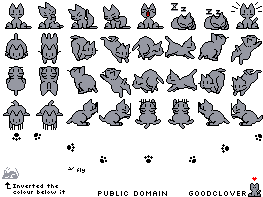
A sheet is either of two layouts, and the plugin detects which it received
from the sheet's width:
- Classic Neko — 263×197px, an 8×6 grid of 32px cells with 1px separators.
The cat frames are the top four rows; the lower rows carry the effects and
text frames. The bundled skins —neko,smokey,ginger,midnightand
biscuit— all ship in this layout. - oneko — 256×128px, an 8×4 grid of 32px cells.
To add your own sheet:
- Put the PNG somewhere your garden can serve — a site-root-relative path like
/img/user/calico.png, or an absolute URL. - Register it in plugin settings, mapping a skin id to the sheet:
{ "skins": { "calico": "/img/user/calico.png" } }. - Show it with
{ "skin": "calico" }to use it for every cat, or
{ "skin": "[\"smokey\",\"calico\"]" }to pin a distinct set. - If the sheet uses a flat background instead of transparency, key it out with
{ "chromaKey": "#00AEF0" }(set it to the background color).
The rules in one place:
- Each cat is a 32×32 cell; the rendered size is set by
scale(16–64px). - Prefer a transparent background;
chromaKeyexists for flat-background sheets. - Use sheets you made, or public-domain ones. The classic sheets are; other
authors' skins are their own, so host them yourself rather than bundling them. - More public-domain classic sheets are archived at
https://bomvel.neocities.org/neko/.